Sepolia demo
Run the whole network on Sepolia from your computer, with one phone on USB. The phone runs three apps: the User wallet and two member apps, Member A and Member B.
The demo currently supports Android phones only.
- Create keys and a network IDMade on the phone. The keys never leave it.Where: User wallet
- Register through a memberMember A puts the ID on chain. The paymaster pays the gas.Where: Member A
- Issue a credentialMember A signs the credential. The User wallet keeps it.Where: Member A
- Check eligibilityMember B learns you qualify, not who you are.Where: Member B
- Revoke a credential, then reuse the IDThe dashboard revokes it and the next check fails. Member B finds the ID: you count once.Where: DashboardMember B
The User wallet and the member apps run on the phone, and the dashboard in your browser. An optional SDK run after the demo shows token delivery to a stealth account. The web wallet and the web member app are not part of this demo.
Watch a run
A narrated, captioned recording of one run, three and a half minutes long. It follows Run the demo, except that Member A runs the first eligibility check and the recording skips step 7.
If the player does not load, open the recording on Google Drive.
The recorded run's contracts
The recording used a deployment made with this guide. Its contracts on Sepolia:
| Contract | Address |
|---|---|
| Governance Safe | 0xf25001D964D37C2a3Ebf3076C5C40d37d5E2fb81 |
| NetworkMemberRegistry | 0x1Dcf10789d3dF7d8dCab0BB52fc505BD2FBFfe72 |
| NetworkMemberGroup | 0x14D3dBAa0d2e9Af730823A769F112eDAf4240Bf4 |
| NetworkMemberGovernance | 0x62836fE015cFf89BaAd09AcE2C86fE5Cc4Cf31F4 |
| ApprovedIssuerSet | 0x501e825d3B17d193ea27a9Fa4C708D4A437F1Ead |
| IdentityRegistry | 0xaA2E44C61EB6CF2e08058229e3B65609FB639fF3 |
| SemaphorePaymaster | 0x9334C58c7ec5713675152a847b66BA156b260dAd |
| CredentialRevocationRegistry | 0xF9ebA2A12b5157944129DD333768Fcc045F6e8B6 |
Before you start
You need:
- Node 22.18 or later, Yarn 4, Foundry 1.8.5 and
jq. - Docker, for the optional SDK run.
- For the phone apps: JDK 17, SDK platform 36, NDK 27.1.12297006 and
adb. - An arm64 phone with USB debugging on.
- Accounts with a Sepolia RPC provider, Etherscan and, for the SDK run, Pimlico. The next section says why.
Four terminals are enough: the first runs everything except the phone apps, including the stack, and the other three each run one phone app.
Install and build from the repository root:
yarn
yarn setup:foundry
yarn build:libraries && yarn build:contracts
Create the secrets
Every key lives in .stack.env at the repository root, which Git ignores. Three values come from outside services:
| Value | What it is for |
|---|---|
SEPOLIA_RPC_URL | Your Sepolia RPC provider. Forge, the stack and, through the stack, the phones reach the chain with it. It must allow eth_getLogs over 10,000 blocks. Alchemy's free tier allows 10, so it fails. The recorded run used the free https://ethereum-sepolia-rpc.publicnode.com. |
ETHERSCAN_API_KEY | The deploy script uploads the contracts' source code to Etherscan, so anyone can read and check it. Nothing else uses the key. |
BUNDLER_URL | A Pimlico Sepolia bundler, from dashboard.pimlico.io. Only the optional SDK run uses it, to send its sponsored transfer. The phones use the stack's own bundler. |
The rest are generated:
| Value | What it is for |
|---|---|
DEPLOYER | Sends the contract deployments and holds no role afterwards. |
OWNER | Owns the governance Safe and the paymaster, and signs for genesis and the running stack. |
STACK_BUNDLER_PRIVATE_KEY | Pays gas for the stack's bundler, which sends the phones' sponsored transactions. |
STACK_MEMBER_SEEDS | Seeds for Member A, Member B and Member C, a candidate this demo does not admit. |
MAX_COST_PER_OP, PAYMASTER_* | Paymaster defaults: the most it pays per operation, its deposit, its stake and unlock delay. |
This creates fresh keys and writes the file:
(
set -e -o pipefail -o noclobber
umask 077
key() { cast wallet new --json | jq -er '.data[0].private_key'; }
deployer=$(key); owner=$(key); bundler=$(key); seed_a=$(key); seed_b=$(key); seed_c=$(key)
cat > .stack.env <<EOF
SEPOLIA_RPC_URL="<your Sepolia RPC URL>"
RPC_URL="\$SEPOLIA_RPC_URL"
ETHERSCAN_API_KEY="<your Etherscan API key>"
BUNDLER_URL="<your Pimlico bundler URL>"
DEPLOYER_PRIVATE_KEY=$deployer
DEPLOYER=$(cast wallet address --private-key $deployer)
OWNER_PRIVATE_KEY=$owner
OWNER=$(cast wallet address --private-key $owner)
STACK_BUNDLER_PRIVATE_KEY=$bundler
STACK_MEMBER_SEEDS=$seed_a,$seed_b,$seed_c
MAX_COST_PER_OP=100000000000000000
PAYMASTER_DEPOSIT=100000000000000000
PAYMASTER_STAKE=1000000000000000000
PAYMASTER_UNSTAKE_DELAY=86400
EOF
)
Running it again refuses to overwrite the file. Replace the three values in angle brackets and keep the quotes. Skip the bundler URL if you skip the SDK run.
Then fund two Sepolia addresses: OWNER with about 1.8 ETH for the setup, and DEPLOYER with about 0.1 ETH. Print
them:
set -a; . ./.stack.env; set +a
echo "OWNER=$OWNER DEPLOYER=$DEPLOYER"
The paymaster stake and deposit come back when you clean up. In the recorded run, the deploy and genesis took about
1.55 ETH from OWNER, almost all of it the stake, the deposit and the account top-ups. Gas cost next to nothing.
Anyone with .stack.env controls the network, and the three seeds cannot be recovered. Never commit or share the file,
and back it up.
Each later step loads the file with set -a; . ./.stack.env; set +a. Run it again in every new terminal.
Rehearse locally
Optional and free. This starts a local chain, deploys, and plays onboarding, issuing, proving, revoking and admission over HTTP:
yarn stack --check
It ends with stack check passed.
Running TESTBED_MODE=testnet yarn workspace integration-testbed serve --check or --check-admission against your
Sepolia deployment sponsors registrations, revokes a credential and leaves rows in the dashboard. --check-admission
also admits Member C for good. Use yarn stack --check instead.
Deploy the contracts
This deploys the contracts, sets up governance, funds the paymaster and admits the founding member. It overwrites the
committed packages/contracts/deployments/11155111.json, which the stack reads. Do not commit it or the
packages/contracts/broadcast/ folder.
cd packages/contracts
set -a; . ../../.stack.env; set +a
yarn deployAndConfigureAll:sepolia \
  --private-keys "$DEPLOYER_PRIVATE_KEY" \
  --private-keys "$OWNER_PRIVATE_KEY" \
  --sender "$DEPLOYER"
cd ../..
It prints ONCHAIN EXECUTION COMPLETE & SUCCESSFUL., verifies the contracts on Etherscan, and ends with
All (7) contracts were verified!. A warning that no bytecode matched the governance Safe is expected: the Safe is a
standard Safe proxy that the script does not compile.
A rerun after genesis breaks the stack. The salts are fixed, so the same OWNER reuses the contracts but rewrites the
deployment file's start block, and the stack reads logs from that block. Deploy once. For a fresh network later, first
withdraw the stake (Clean up), then move the old .stack.env aside and run the secrets step again. The old OWNER key
is the only key that can withdraw the stake and deposit.
The script also writes packages/contracts/network-member.env with the founding member's secret. Back it up with
.stack.env: a later deploy reuses the file if it exists.
Start the network
The pairing QR codes carry each member's server token, so a recording can leak them. Keep the stack terminal,
.stack.env, network-member.env and stack.secrets.json off camera, and open the dashboard link before you record so
it never asks for the key on camera.
Genesis admits Member A and Member B through the Safe, publishes their issuer keys, and funds every account and the
bundler from OWNER. It prints <label>: sent <hash> for each transaction:
set -a; . ./.stack.env; set +a
yarn stack:genesis
Run it once. The first run ends with Genesis: 15 step(s) done, and a second run prints
Genesis: nothing to do, the network is set up. Then serve the network and leave it running in this first terminal:
yarn stack:testnet
Running genesis while the stack serves makes transactions fail. Both sign as OWNER, so their nonces collide.
The stack prints the User wallet's QR, a pairing QR for each member and the path of stack.secrets.json, then
Stack is up. Press Ctrl+C to stop. The secrets file exists only while the stack runs and holds the dashboard link and
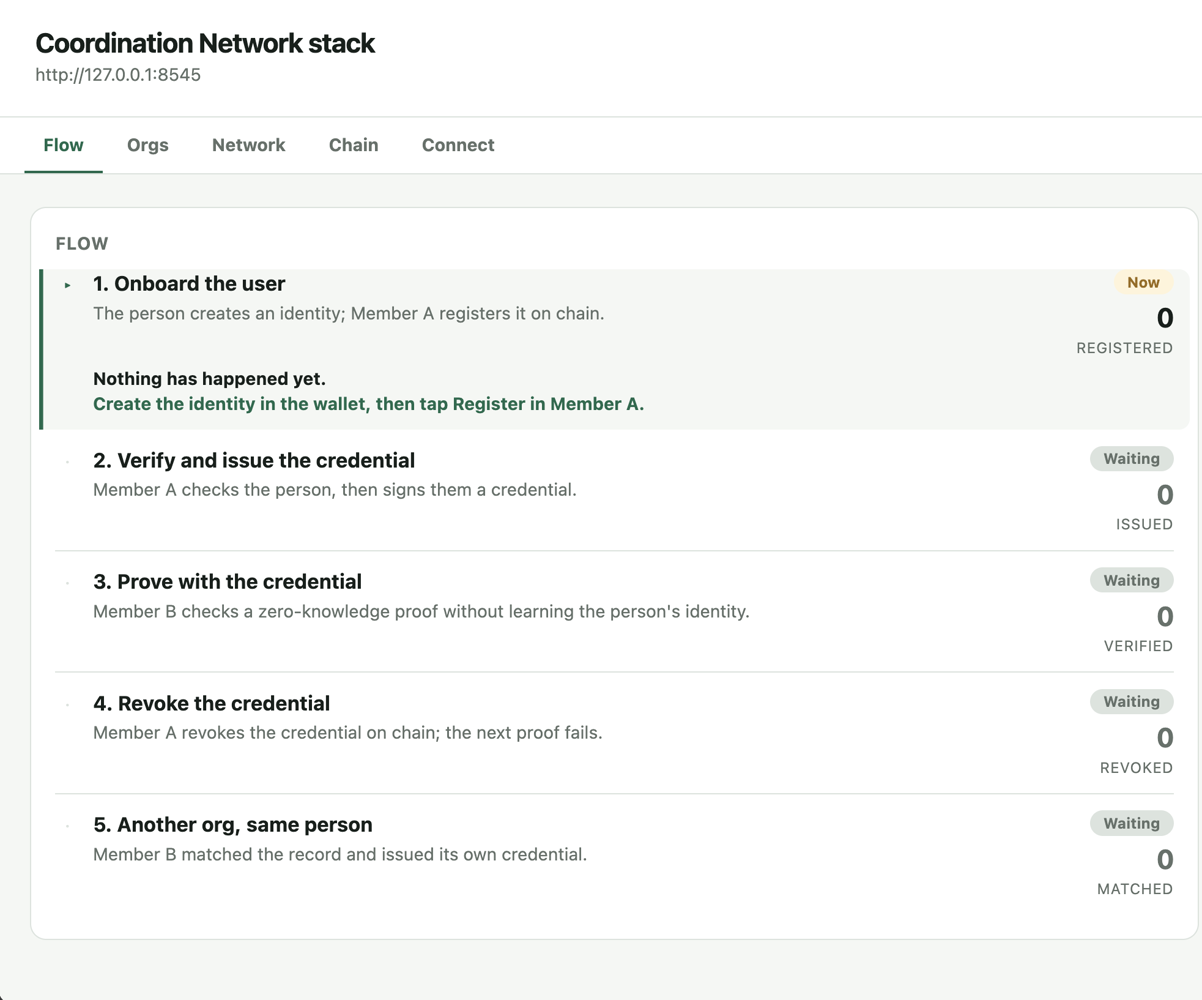
its key. Open the link for the dashboard on http://127.0.0.1:8080. Its Flow tab tracks the demo in five stages and
marks the current one "Now":
Set up the phone
The stack keeps running in the first terminal. First point the build at JDK 17 and the SDK. Find both folders:
- macOS
- Linux
# JDK 17 folder, if you installed it with Homebrew (brew install openjdk@17)
echo "$(brew --prefix openjdk@17)/libexec/openjdk.jdk/Contents/Home"
# JDK 17 folder, for any other installer
/usr/libexec/java_home -v 17
# SDK folder, at its default location
ls -d ~/Library/Android/sdk
# JDK 17 folder, if you installed it with your package manager (sudo apt install openjdk-17-jdk)
ls -d /usr/lib/jvm/*17*
# SDK folder, at its default location
ls -d ~/Android/Sdk
The SDK folder must hold platforms/android-36 and ndk/27.1.12297006. Add these lines to your shell profile, such
as ~/.zshrc or ~/.bashrc, with the two folders:
export JAVA_HOME="<your JDK 17 folder>"
export ANDROID_HOME="<your SDK folder>"
export PATH="$JAVA_HOME/bin:$ANDROID_HOME/platform-tools:$PATH"
JAVA_HOME must point at JDK 17. Newer JDKs, such as 26, fail the build.
Then open three new terminals at the repository root, one each for the User wallet, Member A and Member B. New terminals load the profile. Plug in the phone and check the tools in the second terminal:
java -version   # openjdk version "17..."
adb devices     # lists your phone as "device"
If the phone shows as unauthorized, accept the debugging prompt on its screen.
In the same terminal, run the script below. It copies in the circuit and setup files the User wallet bundles.
apps/user-app/scripts/sync-assets.sh
Forward the ports so the phone reaches the stack on your computer:
for p in 8081 8082 8083 8545 3001 3002 3003 4337 8080; do adb reverse tcp:$p tcp:$p; done
Install the three apps. Each command runs that app's Metro server, so keep each terminal open: the User wallet in the second terminal on port 8081, Member A in the third on 8082 and Member B in the fourth on 8083.
yarn workspace user-app android
yarn workspace network-member-app prebuild:a --clean
yarn workspace network-member-app android:a
yarn workspace network-member-app prebuild:b --clean
yarn workspace network-member-app android:b
The first build of each app takes several minutes. Without --clean, Member B replaces Member A instead of installing
beside it. Both build from one native project folder, which prebuild:b --clean deletes, so wait until Member A opens
on the phone before you run Member B's commands.
Open each app and allow the camera "While using the app". Then pair them with the QR codes in the stack terminal:
- In the User wallet, open Settings and tap "Erase everything" if you used it before.
- In the User wallet, open the Config tab, tap "Scan QR code" and scan its QR.
- Each member app opens on "Connect". Tap "Scan QR". Member A scans the first pairing QR and Member B the second.
Run the demo
Each on-chain step takes 12 to 30 seconds on Sepolia.
| Step | Do | You see |
|---|---|---|
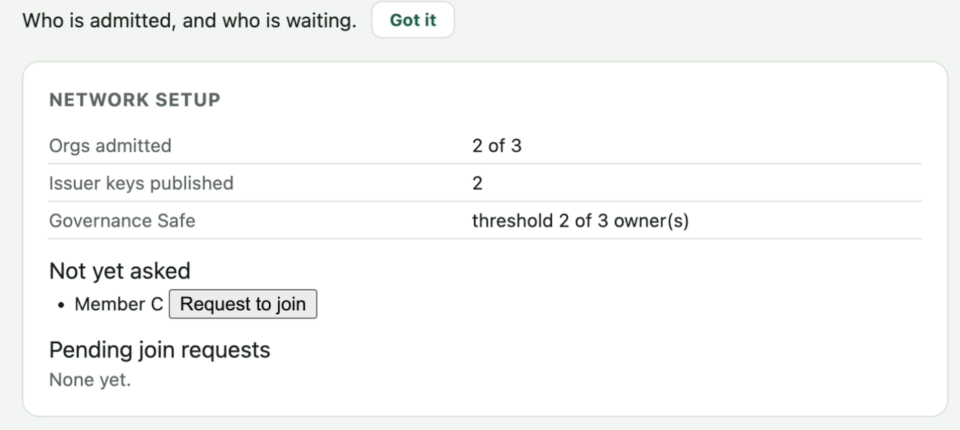
| 1 | Dashboard, Network tab | "Governance Safe" row: "threshold 2 of 3 owner(s)" |
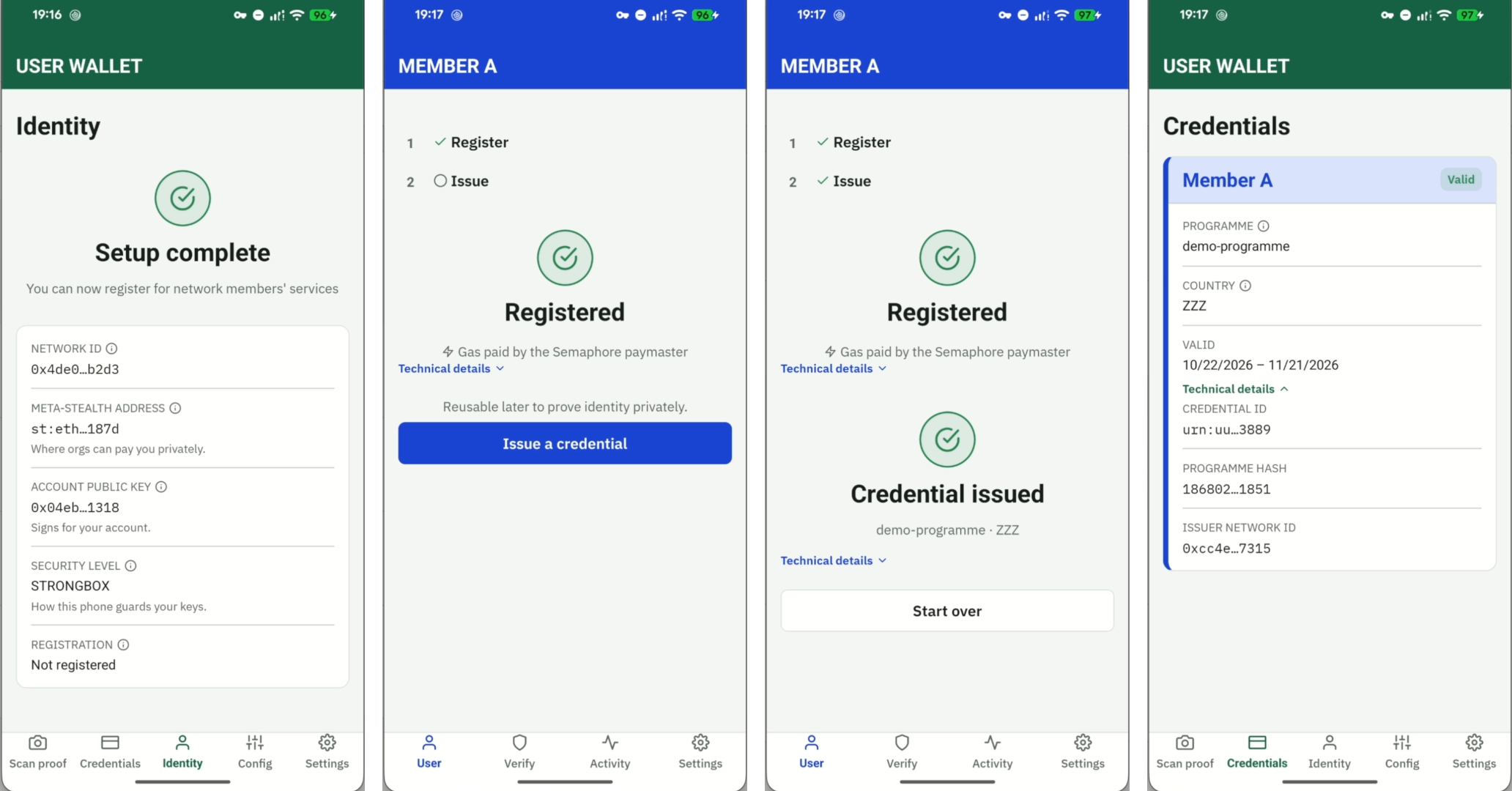
| 2 | User wallet, Identity tab, "Create identity" | "Setup complete" and a network ID |
| 3 | Member A, User tab, "Register". In the User wallet, "Approve" | "Registered" and "Gas paid by the Semaphore paymaster" |
| 4 | Member A, "Issue a credential". In the User wallet, "Approve" | "Credential issued". The User wallet's Credentials tab shows "Valid" |
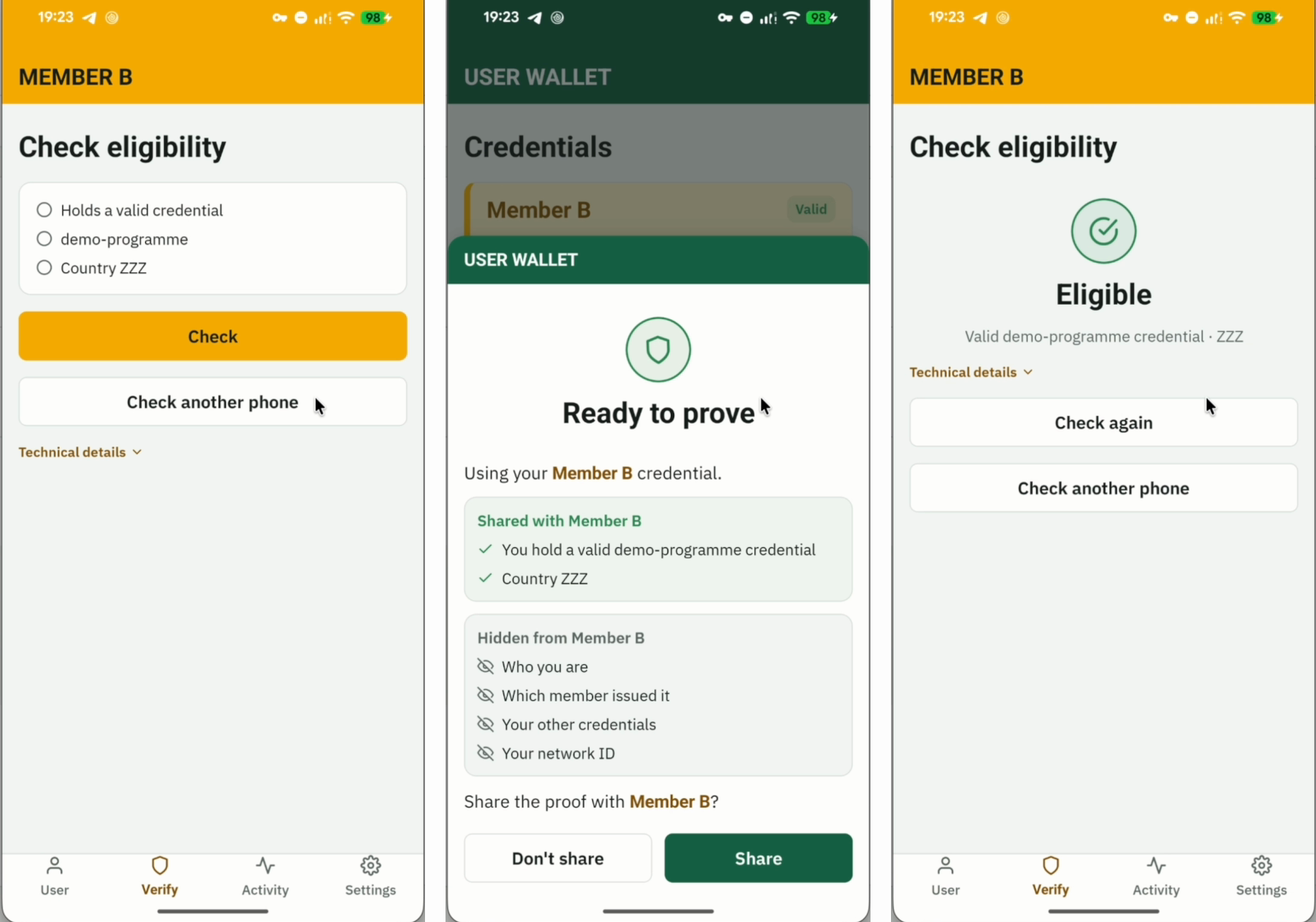
| 5 | Member B, Verify tab, "Check". In the User wallet, "Approve", then "Share" | "Eligible" |
| 6 | Dashboard, Orgs tab, "Revoke" on Member A's credential | The row reads "revoked" |
| 7 | Member B, "Check again". In the User wallet, "Approve" | The User wallet shows "Credential revoked". Tap "Done": "Not eligible" |
| 8 | Member B, User tab, "Register" | "Already registered" and "Not counted twice" |
| 9 | Member B, "Issue a credential". In the User wallet, "Approve" | "Credential issued" |
Wait for the row in step 6 before step 7, because Member B reads the chain when it checks. The dashboard's Chain tab shows the chain ID and the paymaster deposit in collapsed panels.
What the steps look like
These screenshots come from the recorded run in Watch a run.
Step 1, the Network tab:
Steps 2 to 4: the User wallet after "Create identity", Member A after "Register" and after "Issue a credential", and the credential in the User wallet's Credentials tab:
Step 5: Member B's check, the User wallet's proof screen and the result. Before you tap "Share", the User wallet lists what the verifier learns and what stays hidden. These come from the recorded run's later check, so the User wallet proves with Member B's credential. At step 5 it proves with Member A's.
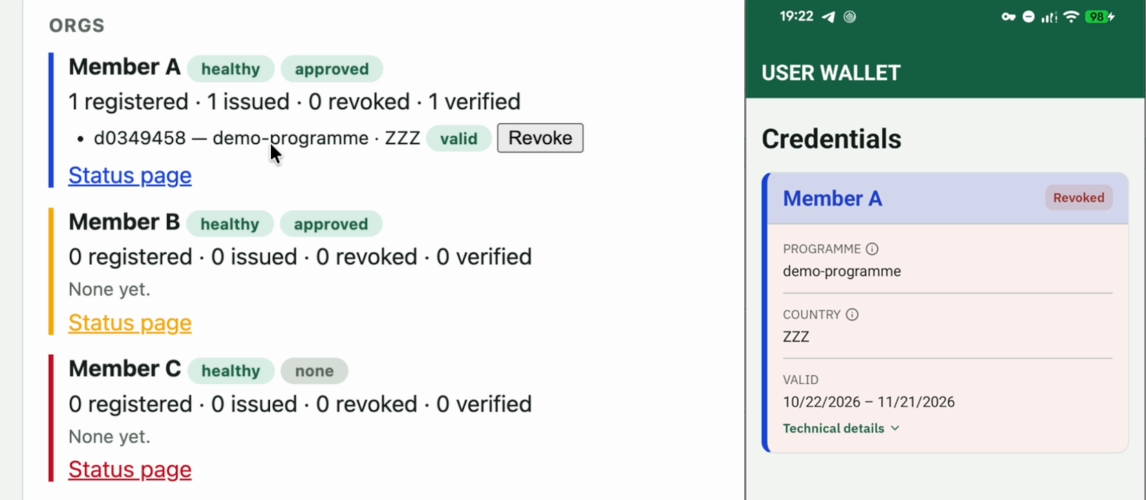
Step 6: the Revoke button on the Orgs tab, and the User wallet once the revocation lands:
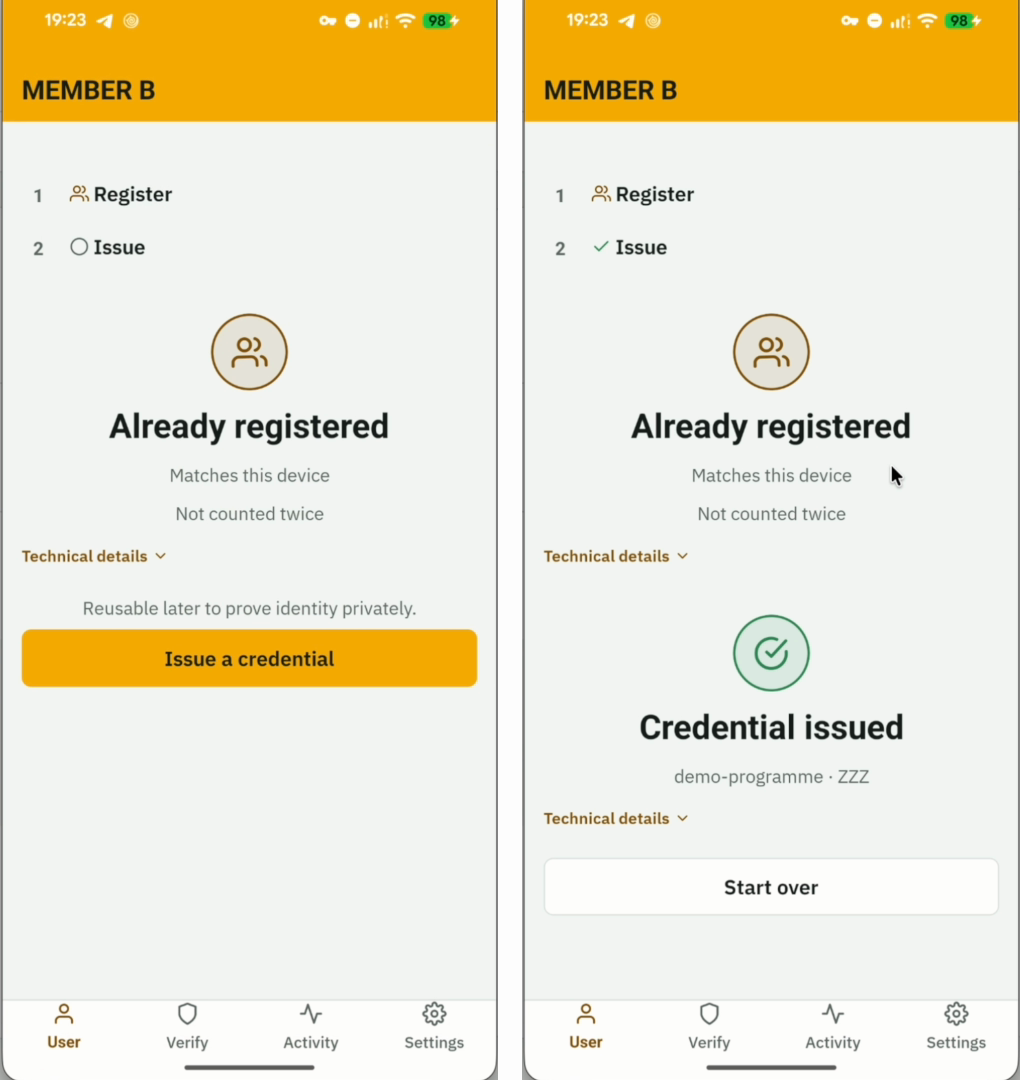
Steps 8 and 9: Member B finds the existing registration, then issues its own credential:
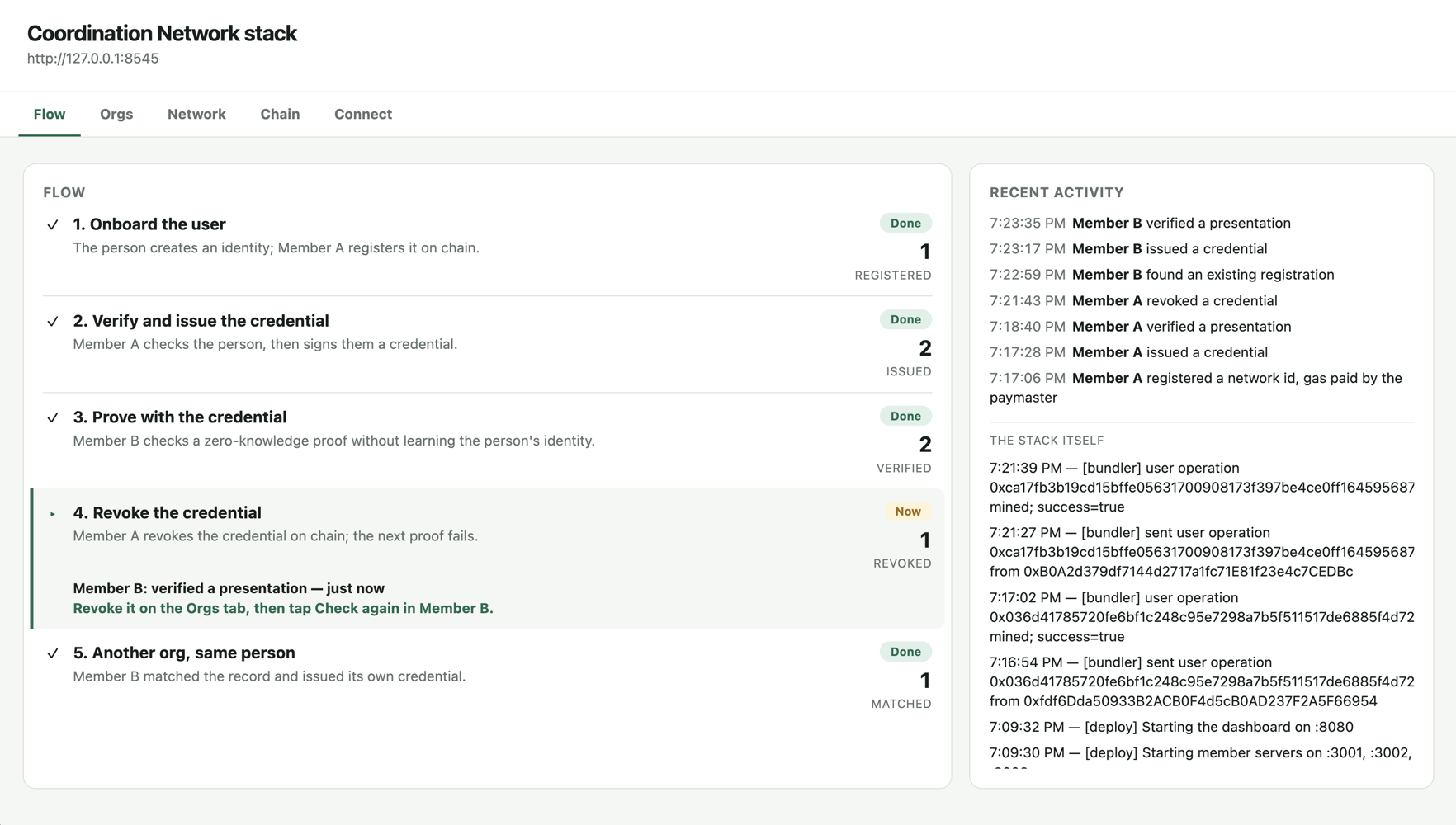
The Flow tab at the end of the recorded run. Its "Revoke the credential" stage turns "Done" only after a check fails on the revoked credential, which is step 7 above. The recording skips that step, so the stage still reads "Now":
Optional: show deliveries with the SDK
Optional, and not in the recording. This shows what the phones cannot: the User wallet never scans announcements and
the stack runs no indexer. It needs BUNDLER_URL and Docker.
Stop the stack first with Ctrl+C in the first terminal, because the SDK run and the stack both sign as OWNER and their
nonces can collide. Run this before you clean up, because its sponsored transfer is paid from the paymaster deposit.
Deploy the test token:
cd packages/contracts
set -a; . ../../.stack.env; set +a
forge script script/test/DeployTestScopedToken.s.sol --rpc-url sepolia --broadcast --private-key "$DEPLOYER_PRIVATE_KEY"
cd ../..
Copy the address it prints after TestScopedToken, or from the == Return == block if the token already exists. Add it
to the file, then load the founding member's secret:
echo "TEST_SCOPED_TOKEN=<address>" >> .stack.env
set -a; . ./.stack.env; . packages/contracts/network-member.env; set +a
Run the test from the repository root:
yarn workspace integration-testbed test:testnet
It issues Alice a credential, has Bob verify it, revokes it, then delivers 100 tokens to Alice's stealth address. Alice sends 40 to Bob, paid by the paymaster. Look for these lines:
Member -> Alice: 100 tokens; mint <hash>; announcement <hash>
Alice discovered stealth account <address> automatically; balance 100
Alice sent 40 to Bob; paymaster sponsored user operation <hash>; transaction <hash>
Clean up
When you are done, stop the stack with Ctrl+C in the first terminal if it is still running. The paymaster holds your stake and deposit, and you take both back in two steps. First withdraw the deposit, which also starts the unstake delay:
cd packages/contracts
set -a; . ../../.stack.env; set +a
export SEMAPHORE_PAYMASTER=$(jq -r .semaphorePaymaster deployments/11155111.json)
export PAYMASTER_WITHDRAW_TO=$OWNER
forge script script/utils/WithdrawPaymasterDeposit.s.sol --rpc-url sepolia --broadcast --private-key "$OWNER_PRIVATE_KEY"
cd ../..
A day later, withdraw the stake, in a new terminal if you like. Keep deployments/11155111.json until then, because
this step reads the paymaster address from it:
cd packages/contracts
set -a; . ../../.stack.env; set +a
export SEMAPHORE_PAYMASTER=$(jq -r .semaphorePaymaster deployments/11155111.json)
export PAYMASTER_WITHDRAW_TO=$OWNER
forge script script/utils/WithdrawPaymasterStake.s.sol --rpc-url sepolia --broadcast --private-key "$OWNER_PRIVATE_KEY"